201
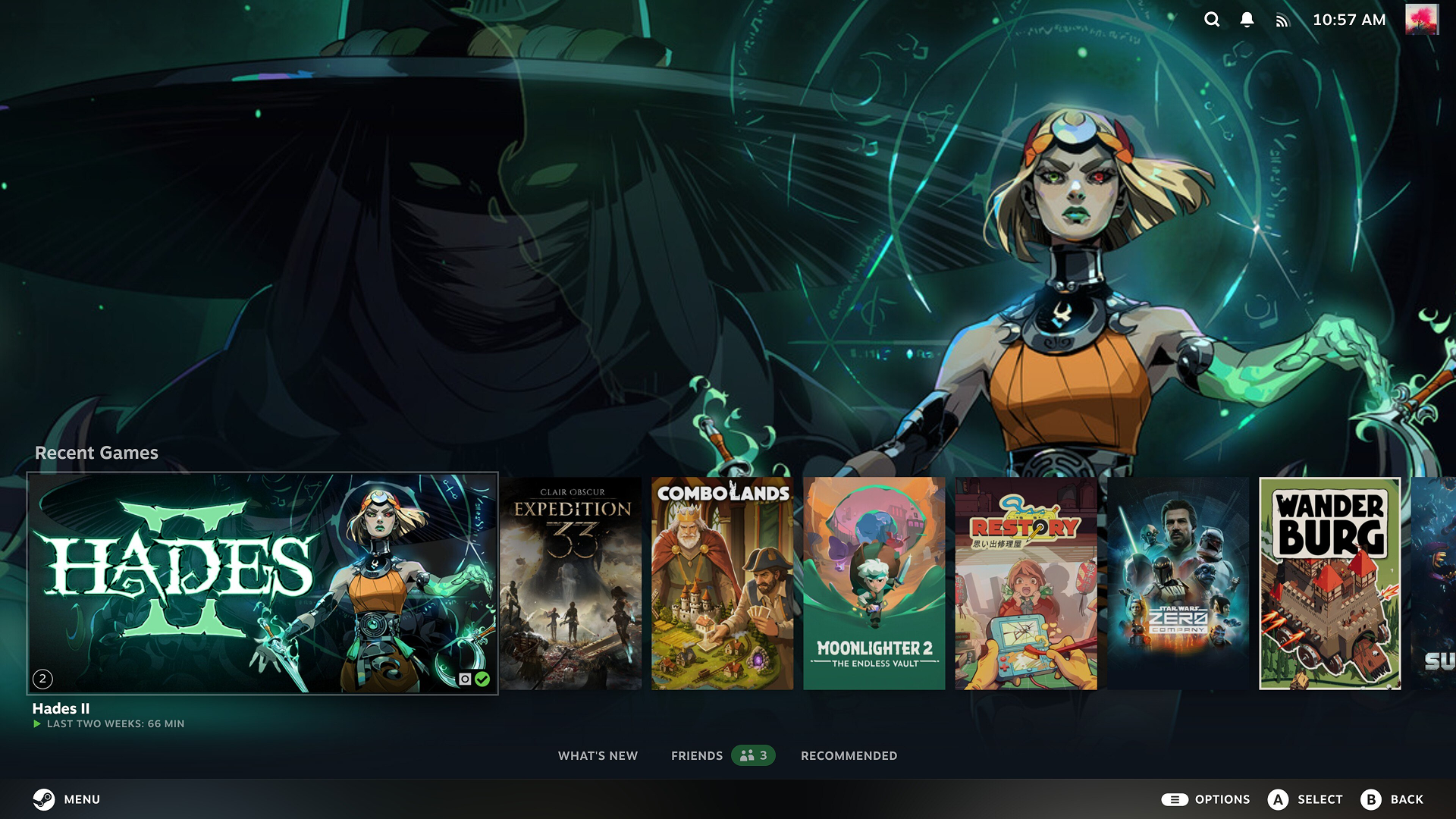
The October 13 Steam Client update introduces several new features for Big Picture Mode, including Big Art Mode, a Personal Calendar shortcut, and customisable screensavers. Valve has also improved Steam Input with new configuration tools, additional controller options, and better performance when loading configurations.
The update includes a wide range of fixes across the desktop client, in-game overlay, game recording, Remote Play, Linux, and Steam Controller firmware. Improvements to startup performance, streaming quality, controller connectivity, and download speeds are also included, alongside fixes for crashes and other persistent issues.

Steam Client Update October 13 Patch Notes
Big Picture Mode and Homescreen
- Added a new Big Art Mode option for the homescreen, available under Settings > Home.
- Added Personal Calendar to the Recommended tab on the homescreen.
Screensaver Improvements
- Added a new screensaver feature under Settings > Customization.
- Added a configurable game art slideshow that can display artwork from recently played games and recent in-game screenshots.
- Added a retro-inspired bouncing logo screensaver.
- Added support for custom screensavers in Big Picture Mode.
- Custom screensavers can be placed in the
config\uioverrides\screensaversdirectory within the Steam installation folder.
General Fixes and Improvements
- Improved Steam Client startup performance.
- Prevented the Steam main window from stealing focus if another window becomes active during startup or login.
- Improved achievement notification text layout when names or descriptions wrap across multiple lines.
- Ensured dialogs for serious errors remain above the main window.
- Fixed an issue on Windows where exiting Steam through the system tray while the window was minimised briefly displayed the window.
- Fixed the on-screen keyboard failing to work the first time it was opened on desktop.
- Fixed hangs and crashes affecting users with older CPUs when starting downloads for games containing many identical files.
- Fixed desktop shortcuts ignoring saved launch options and using the default option instead.
- Fixed library playtime temporarily displaying an incorrect value.
- Fixed Steam failing to reconnect automatically for some users after server maintenance.
- Fixed an issue where multiple credential refresh prompts could trigger an immediate restart.
- Fixed the Suspend Download Throttle setting failing to update correctly on the downloads page.
- Fixed the Recordings and Screenshots dialog failing to list all games with related screenshots in its game filter.
- Fixed a crash at launch on Windows systems with EZFRD64.DLL installed.
In-Game Overlay
- Improved Performance Monitor FPS graph scaling across different text scaling settings.
- Fixed a crash occurring when Vulkan games recreated their swapchain.
- Fixed frame rate hitches in Direct3D 11 and Direct3D 12 games when taking screenshots on Windows.
- Fixed overlay rendering and related features, including screenshots and game recording, in Vulkan games that create multiple windows.
Library
- Fixed DLC hover interactions failing to work in some areas of the Steam Library.
Game Recording
- Fixed playback jumping to an unexpected point in the timeline when reaching the end of a play session or clip.
- Reduced the performance impact of game recording in some Direct3D 12 games on Windows.
Big Picture Mode Fixes
- Delayed screen dimming and screensaver activation when the Steam Store, web browsers, or other apps request that monitor sleep and screensavers be disabled during video playback.
- Added a setting to disable the screensaver while in-game.
- Added explicit warning text to power menu confirmation dialogs when proceeding would shut down an active game.
- Added keyboard glyphs to the footer when navigating Big Picture Mode with a mouse and keyboard.
- Prevented the on-screen keyboard from appearing when clicking text input with a physical mouse.
- Improved the Quick Access Menu Voice Chat tab layout.
- Added a mute toggle to voice chat volume sliders.
- Fixed the link from the Voice Chat tab to an active chat so that the text box receives focus when the chat window opens.
- Updated default artwork for apps without library or hero artwork.
- Reorganised idle timer settings for battery and AC power.
- Made the mouse cursor remain hidden in the overlay until mouse movement is detected.
- Added Wi-Fi signal strength and connection type to the header on Windows.
- Fixed footer button clicks causing control glyphs to switch back to gamepad icons.
- Fixed the footer back button failing when no item on the page had digital navigation focus.
- Fixed the Steam logo spinner moving during the login process.
- Fixed Windows guide button presses opening the main Big Picture Mode window instead of the in-game overlay in certain cases.
- Fixed the main Big Picture Mode window failing to receive focus after quitting a game in certain cases.
- Fixed the on-screen keyboard dropping key presses during dual-trackpad typing.
- Fixed diacritic options menu interactions during dual-trackpad typing.
- Fixed the on-screen keyboard failing to appear in non-Steam games after toggling Wi-Fi or suspending the device.
- Fixed trackpad typing issues when the trackpad was touched while the on-screen keyboard was opening.
Steam Input Improvements
- Added a new configurator view for Steam Input API games that lists actions and their bindings rather than inputs mapped to actions.
- Streamlined the controller binding interface.
- Added a multi-binding configuration page for creating button combinations, with a timeline showing command outputs and their settings.
- Added support for the user-invoked on-screen keyboard in the desktop overlay.
- Added information about compatible configurations in the configurator browser for games requiring Steam Input API.
- Added missing settings for adjusting emulated joystick adaptive centring on trackpads.
- Added support for inverting button chord bindings.
- Added support for switching to Lizard mode on the new Steam Controller when interacting with Windows UAC windows and other areas where Steam Input is blocked.
- Added a configurator landing page when no local configuration file can be loaded, allowing users to select another configuration.
- Added a Reorder Controller dialog for Steam Input API games. This temporarily disconnects controllers, which may cause older games without proper hot-plugging support to lose controller input.
- Improved cloud sync status information in the configurator and added an option to skip syncing and proceed to configuration.
- Improved CPU performance during runtime and configuration loading.
- Improved trackpad sensitivity consistency between Steam Deck and Steam Controller.
- Applied desktop controller configurations within the desktop UI overlay, allowing compatible devices with custom desktop configurations to use mouse input.
- Changed Linux gamepad input reshuffling to occur when the last running game exits rather than when a game launches, helping avoid issues when multiple apps run simultaneously.
- Set Steam Frame controllers to use gamepad input by default in VR games that do not support VR inputs. This can be changed in the game’s Steam Input settings or the VR Controller settings on the Now Playing page.
Steam Input Bug Fixes
- Fixed pairing issues with the 2015 Steam Controller.
- Fixed Switch controller glyphs in Heavy Rain.
- Fixed an issue on Linux where swapping controllers on the Reorder Controller screen sometimes failed.
- Fixed button and slider sizing issues in the configurator when opened in the desktop overlay.
- Fixed Windows handheld controllers incorrectly taking priority over docked controllers in Steam Input API games.
- Fixed the controller support widget incorrectly reporting that unreleased games do not support controllers when support information was unavailable.
- Fixed controllers failing to use desktop configurations on the desktop UI login window.
- Fixed older unnamed Virtual Menus appearing as Create Virtual Menu in some views.
- Fixed duplicate Xbox-style controllers appearing on Windows.
- Fixed duplicate Steam Controllers appearing on macOS.
- Fixed glyphs for Xbox Elite Controller paddle buttons.
- Fixed Virtual Menu modes displaying the wrong activation type when created through the standalone menu rather than a controller source.
Remote Play Improvements
- Added experimental support for the Pyrowave video codec, designed for high-bandwidth, low-latency video streaming.
- Added the
-pyrowavestatscommand-line option to log Pyrowave encoding performance. - Added the
@PyrowavePSNRand@PyrowaveHeightFactorconfiguration variables for tuning automatic bitrate calculations. - Greatly improved Vulkan capture performance.
- Improved streaming colour accuracy, clarity, and brightness.
- Added automatic fallback to H.264 when HEVC is unavailable.
- Disabled HDR when streaming to the OLED Steam Deck.
- Removed the PIN requirement for downloading an app to a remote device. A PIN is still required to install and stream from a remote device.
- Added a Download Complete notification when a remote download was initiated from the current device.
- Fixed EULA acceptance when starting a Remote Stream.
- Fixed streaming launch failures when the host client had a cloud conflict.
- Added a recovery dialog for situations where the network cannot handle the current streaming settings.
Linux Improvements and Fixes
- Made the Select Compatibility Tool dropdown permanently visible.
- Moved the recommended compatibility tool, or Steam Runtime for native games, to the top of the list as the Default option.
- Added support for selecting compatibility tool aliases, such as Proton Stable, from the dropdown.
- Configured Windows binaries registered as non-Steam games to run through Proton by default.
- Fixed non-Steam games failing to launch after changing the target binary through the Browse button.
- Updated SteamOS compatibility dialogs to appear in the desktop UI when installing games not verified for the relevant hardware.
- Added the SteamOS unsupported dialog on desktop Linux when installing games known not to work with Proton.
- Improved download speeds on high-latency connections.
- Improved hardware survey distribution information collection, prioritising data from
/etc/os-release. - Fixed virtual gamepads being temporarily disconnected when a game called the
ISteamUtils::SetGameLauncherModeAPI, which could cause games without controller hot-plugging support to lose input. - Fixed the Stop button failing to close games launched through external tools.
Steam Controller Firmware
- Added a second Bluetooth Low Energy pairing slot.
- Added pairing instructions for the second slot: hold L1 + B + Steam while powering on the controller.
- Added slot switching controls: hold L1 + B + Steam or R1 + B + Steam during startup to select the desired slot.
- Improved rumble emulation and added configurable intensity levels.
- Reduced the time required for the controller to connect fully to Steam.
- Fixed repeated disconnections affecting some Bluetooth Low Energy connections, particularly on Steam Deck.
- Fixed pairing failures when using a puck connection.
- Fixed an issue where BLE mode remained active even when the host device could not be found.
- Fixed an issue causing certain thumbsticks to lose their full range of movement.
Have you noticed these changes? Share your thoughts in the comments!